AI Quickstart Generator
Transform your system descriptions into complete UML models with AI-powered design creation
Watch the AI Quickstart Generator in action
How It Works
The AI Quickstart Generator uses advanced language models to understand your system requirements and automatically generate comprehensive UML diagrams. Simply describe your system in natural language, and the AI will analyze your requirements to suggest the optimal diagram structure.
Step 1: Describe Your System
Enter a detailed description of the system you want to build. Include information about:
- What the system does and who uses it
- Core entities and their relationships
- Key user flows and interactions
- Main features and capabilities
- Business processes and workflows
- Stateful entities (orders, tasks, requests, etc.)
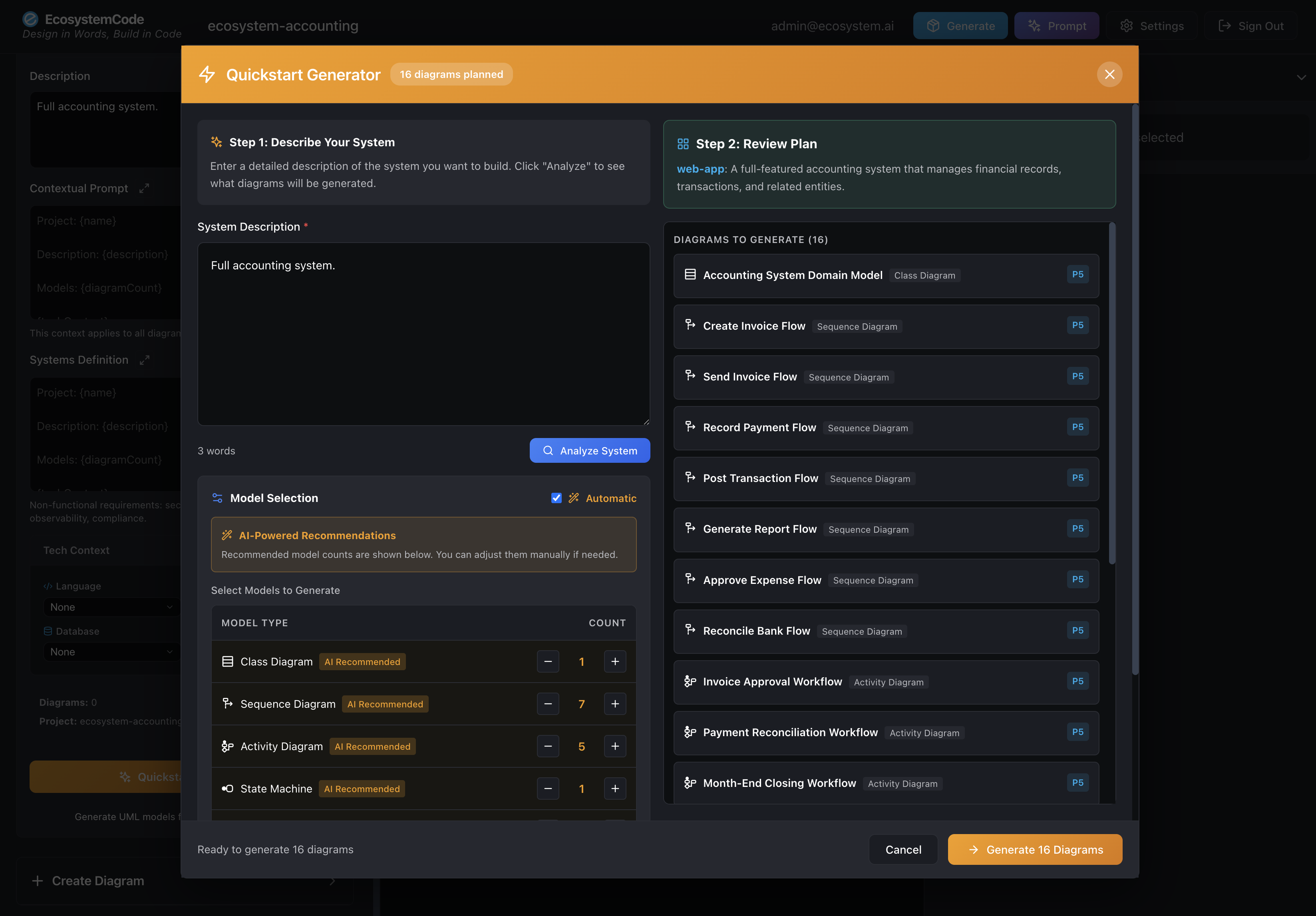
Step 1: Enter your system description and review AI-recommended diagram types
Step 2: AI Analysis & Generation
Our AI analyzes your description and suggests the optimal diagram types and counts. You can review and adjust the recommendations before starting generation. The process runs in the background, allowing you to continue working while diagrams are being created.
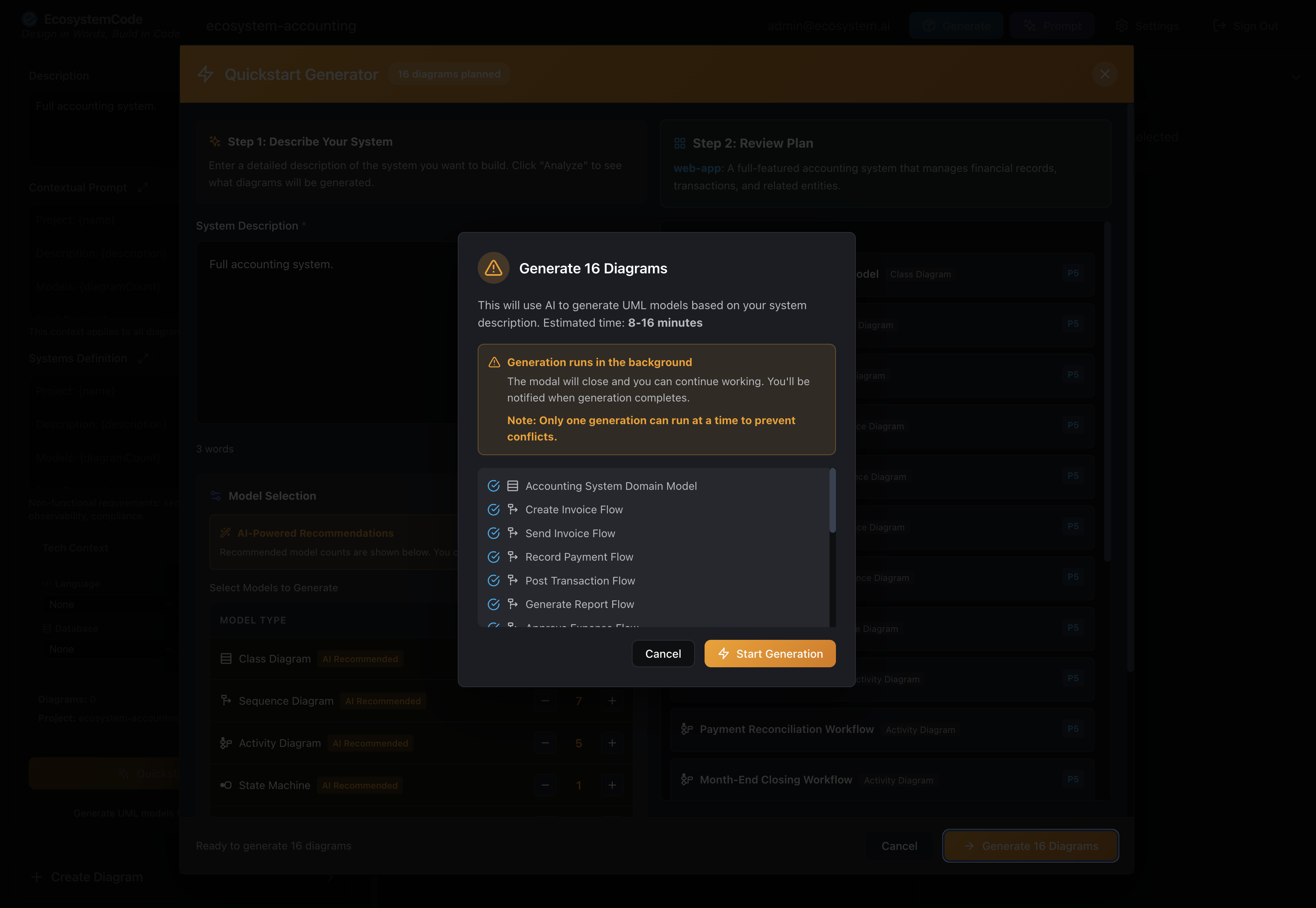
Step 2: Generation runs in the background - you can continue working while diagrams are created
Step 3: Track Progress
Monitor the generation progress in real-time. See each diagram being generated, track completion status, and view generated models as they become available. The system provides detailed progress information including current step, overall completion percentage, and a list of completed diagrams.
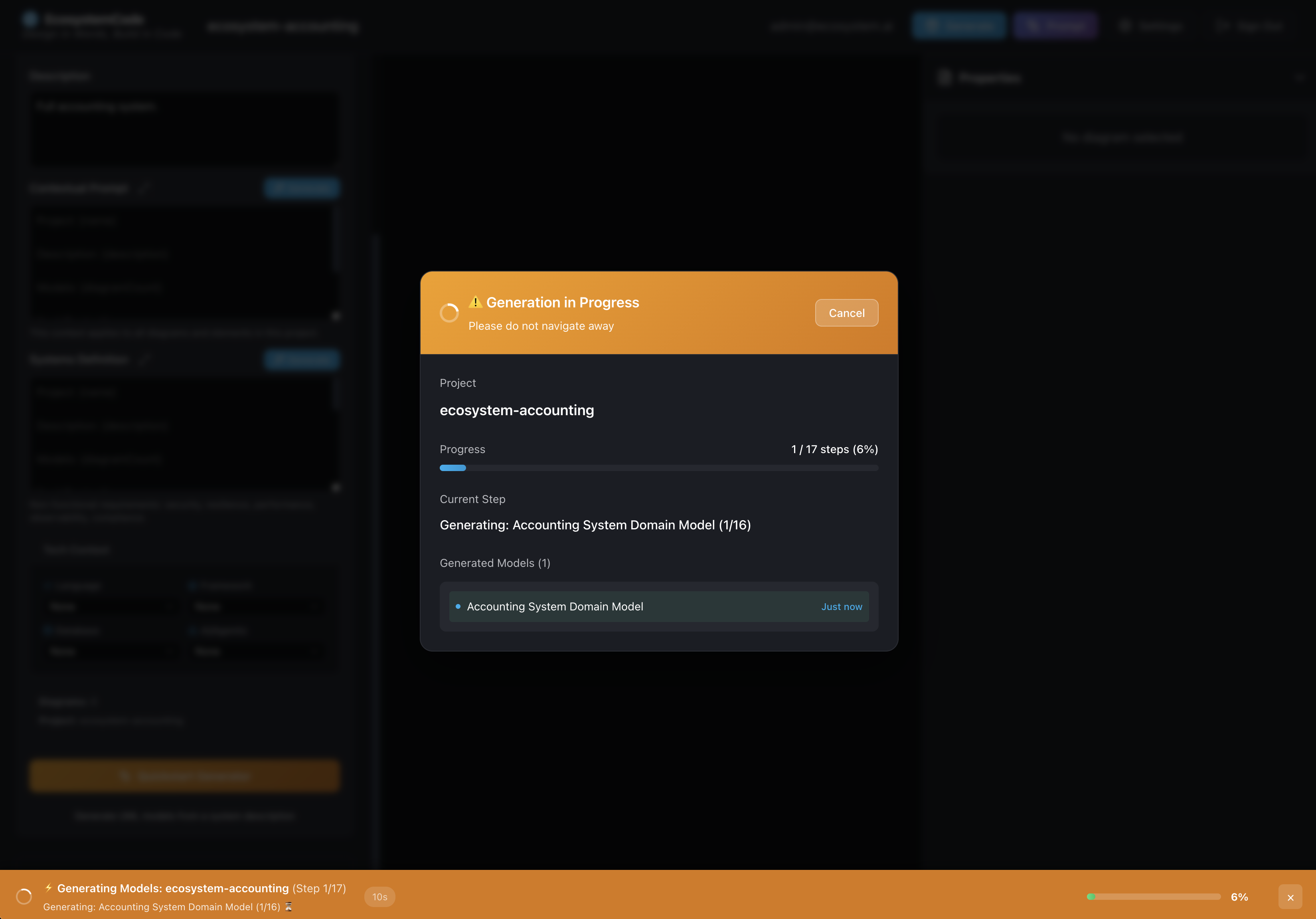
Step 3: Real-time progress tracking with detailed status for each diagram being generated
AI-Powered Analysis
The AI analyzes your system description to identify:
- Core entities and their relationships
- Business processes and workflows
- Stateful entities requiring state machines
- User interactions requiring sequence diagrams
- System components and architecture
Best Input Formats for POs and Analysts
EcosystemCode works best when you provide structured input. Here are the formats that produce the most accurate results:
Epic Format
Start with a high-level description that includes business context:
I need a [SYSTEM NAME] for [TARGET USER/ORGANIZATION].

Business Context: [Why this system is needed]

Key Features:
- [Feature 1]
- [Feature 2]
- [Feature 3]

User Roles: [Who uses the system]
User Story Format (Given/When/Then)
For best results, use the Given/When/Then format for acceptance criteria:
As a [ROLE],
I want to [ACTION],
So that [BENEFIT].

Given [PRECONDITION]
When [ACTION]
Then [EXPECTED RESULT]
Constraints & Non-Functional Requirements
Include any constraints that affect the design:
- Performance: "Must handle 1000 concurrent users"
- Security: "Requires role-based access control"
- Integration: "Must integrate with Stripe for payments"
- Compliance: "Must be GDPR compliant"
Questions We'll Surface
If your input is unclear, EcosystemCode's validation will ask about:
- Missing entity relationships
- Undefined state transitions
- Ambiguous workflows
- Incomplete user roles
- Missing edge cases
This helps ensure you catch gaps before generating code.
Prompt Generation for Enhanced Reliability
EcosystemCode generates comprehensive, structured prompts from your UML designs that can be used with any Large Language Model (LLM) to create more reliable and accurate system implementations.
Universal LLM Compatibility
The generated prompts work seamlessly with all major LLM providers and tools:
- OpenAI - GPT-4, GPT-3.5, and other models
- Google Gemini - Gemini Pro and advanced models
- Anthropic - Claude models
- Cursor - AI-powered code editor
- Windsurf - AI development environment
- Any other LLM that accepts text prompts
Why Use Generated Prompts?
These structured prompts provide:
- Complete Context - All your UML diagrams, relationships, and business logic in one comprehensive prompt
- Consistency - Ensures the LLM understands your entire system architecture
- Accuracy - Reduces errors by providing complete system context upfront
- Reliability - More predictable results when generating code or documentation
- Portability - Use the same prompt across different LLM providers for consistent results
Whether you're generating code, documentation, tests, or system analysis, these prompts ensure your LLM has complete context about your system design, leading to more accurate and reliable outputs.
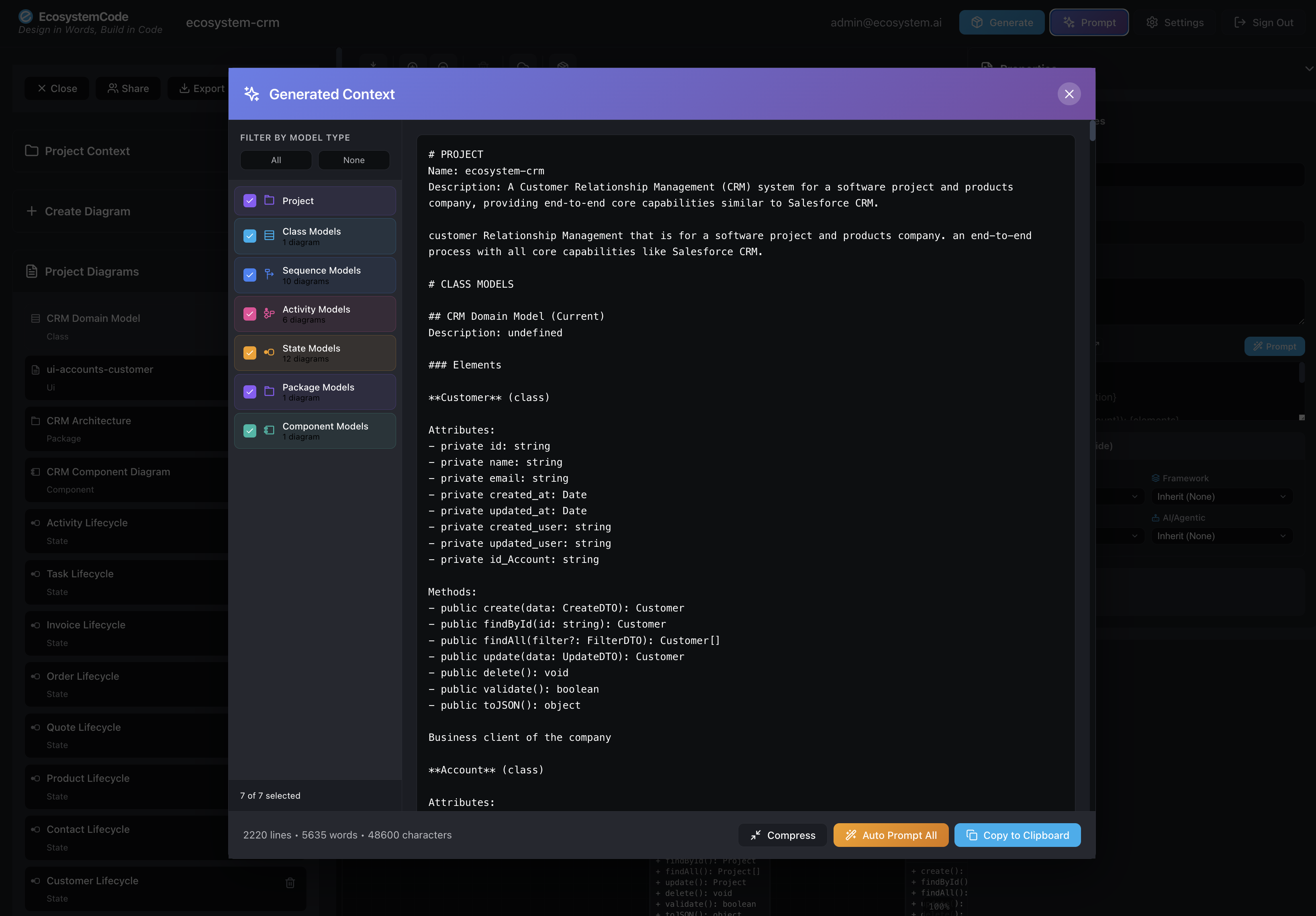
Generated Context Prompt - Complete system information extracted from all UML diagrams, ready to use with any LLM
Just Run It - Complete Deployment Ready
AI Quickstart builds your UML models. When you are ready to ship code, use deterministic full-stack code generation (default)—template-based from validated UML with limited LLM calls—to produce a complete, production-ready application you can run immediately. No additional configuration needed; everything is generated and ready to deploy.
What Gets Generated
Your generated application includes:
- Full-Stack Application - React frontend, Node.js backend, MongoDB schemas
- Docker Configuration - Complete Docker Compose setup for local development
- Build Scripts - One-click start scripts for Mac, Windows, and Linux
- Deployment Files - Dockerfiles, environment configurations, and infrastructure as code
- Cloud Deployment Options - Ready for AWS, GCP, Azure, or any container platform
Run Locally or Deploy to Cloud
Start your application locally with a single command, or deploy directly to your preferred cloud platform. The generated code includes all necessary configuration for both scenarios.
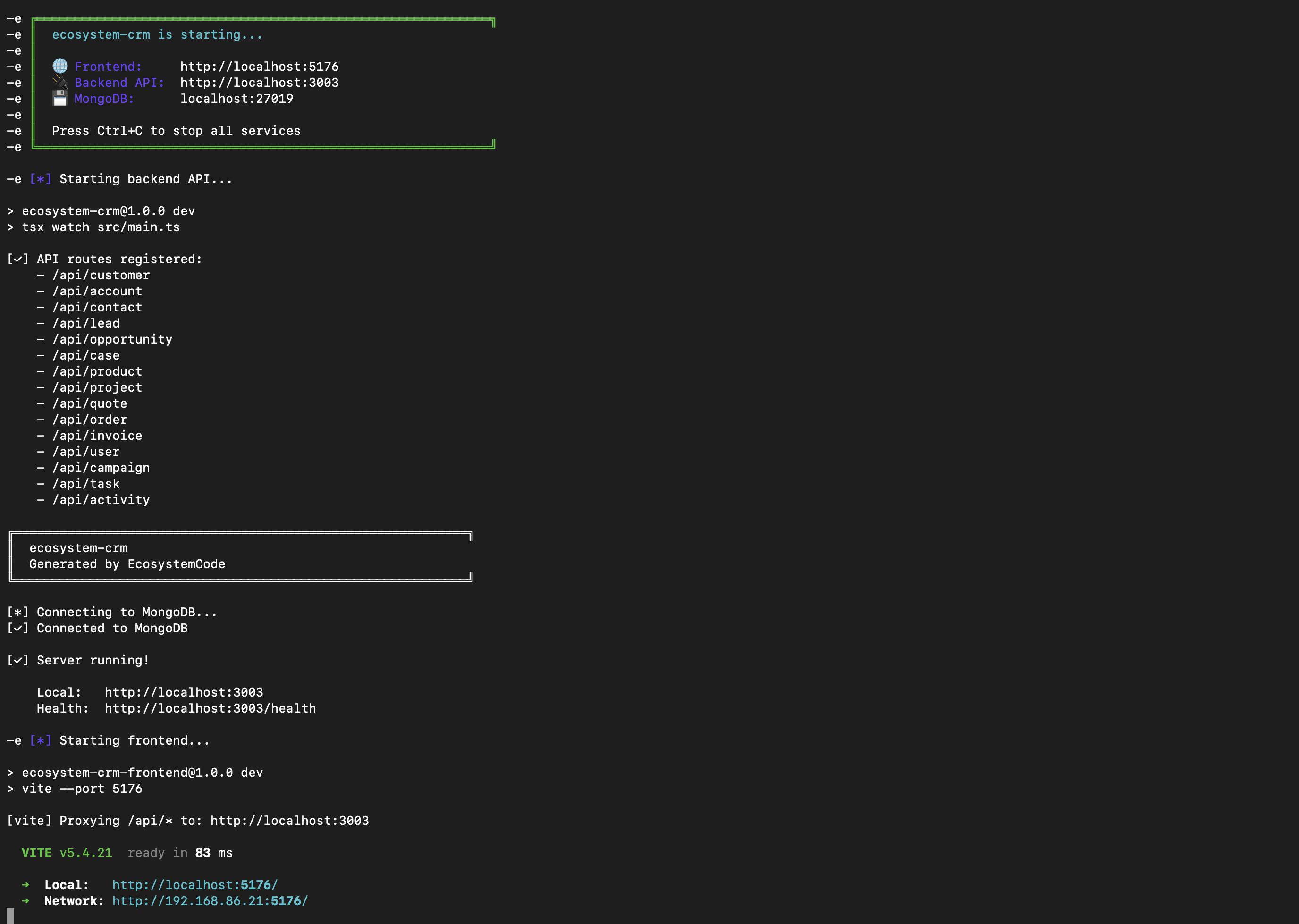
Generated Application Running - Complete stack with frontend, backend API, and MongoDB, all running and ready to use
Immediate Results
As shown in the screenshot, your generated application includes:
- Frontend Server - React application running on a local port
- Backend API - Complete REST API with all entity endpoints
- Database Connection - MongoDB configured and connected
- Health Checks - Built-in health endpoints for monitoring
- API Proxy - Frontend automatically configured to communicate with backend
Everything is generated, configured, and ready to run. No manual setup required - just start the application and begin using your system immediately.