Full-Stack Code Generation
Transform your UML diagrams into production-ready applications with 197+ generated files
Deterministic full-stack generation (default)
Once your UML is validated, EcosystemCode generates the full application from tested templates—not open-ended LLM codegen. The default path uses limited LLM calls, produces the same baseline every run from the same model, and ships 197+ files: React UI, REST API, database schemas, Docker, Swagger, MCP, and documentation.
Optional: AI Enhanced generation
When you need richer domain logic, multi-stack output, or an AI code-review step, switch to AI Enhanced mode in the generation modal. Expect more LLM usage, longer runs, and output that may vary between generations.
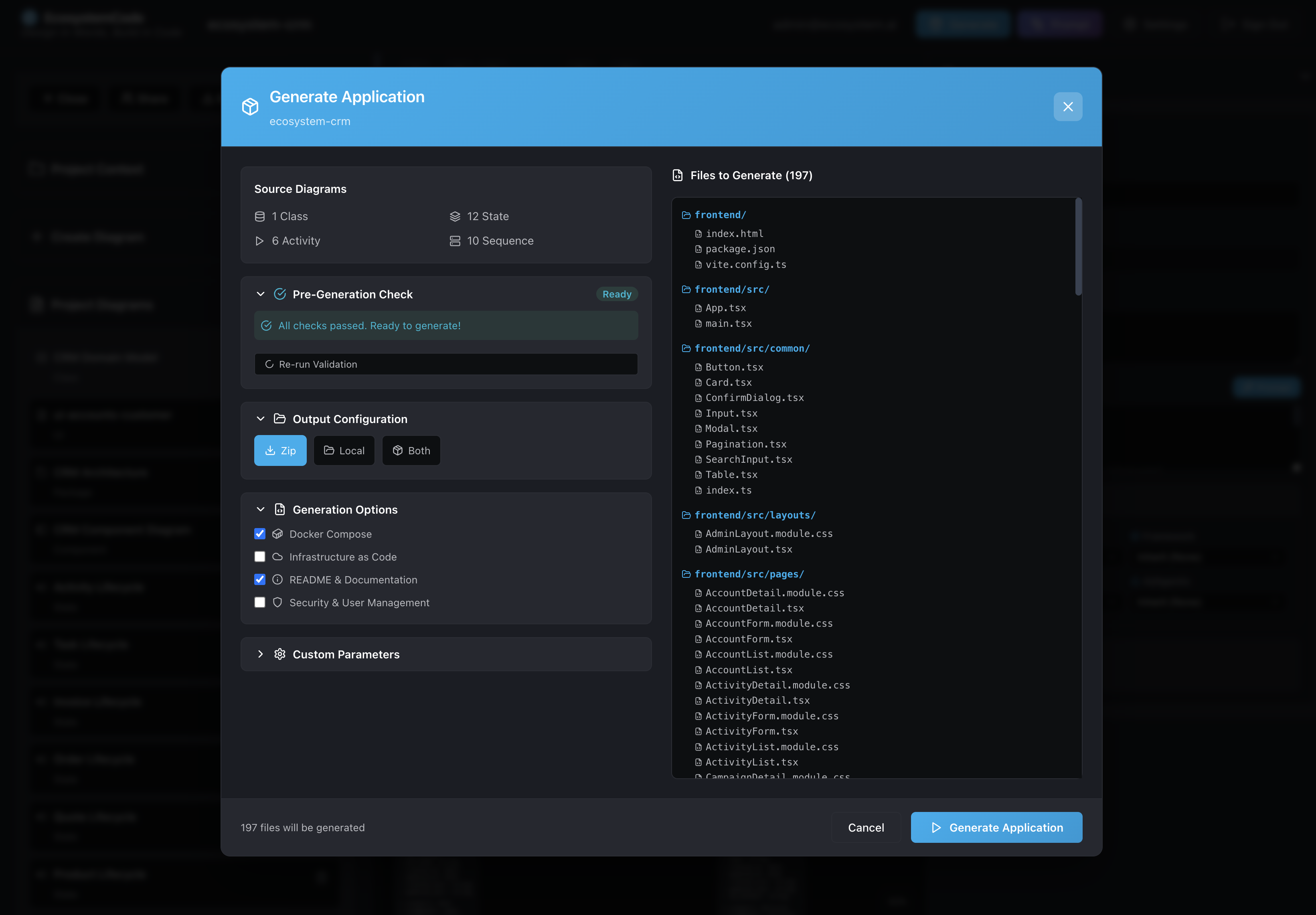
Code Generation Interface
The generation modal provides a comprehensive interface for configuring and previewing code generation. As shown in the screenshot, you can see the complete file structure that will be generated (197+ files), run pre-generation validation checks, and configure output options including Docker Compose, infrastructure as code, and documentation.
Generation Process
The code generation process is fully tracked with real-time progress updates. You can see each file being generated, monitor the progress percentage, and view any warnings or errors that occur during the process.
Single App Build & Generation
Watch the complete generation process in action - from UML diagrams to production-ready code:
What Gets Generated
From your UML diagrams, EcosystemCode generates a complete, production-ready application stack:
Backend Code
- MongoDB schemas (Mongoose models) from class diagrams
- Repository pattern implementations
- API routes and controllers from sequence diagrams
- State validators from state machine diagrams
- Workflow handlers from activity diagrams
- Security modules (authentication, authorization)
- Logging and error handling
- OpenAPI spec + Swagger UI for interactive API documentation
- MCP server exposing all API operations as agent tools (full CRUD)
Agent-Ready APIs (Swagger + MCP)
Generated backends are built for agentic workflows: humans can explore the API in Swagger UI, and MCP agents can discover and call tools for every API operation (including full CRUD).
- Swagger UI:
/docs - OpenAPI JSON:
/openapi.json - MCP endpoint (Streamable HTTP):
/mcp
Frontend Code
- React components for entity management
- List, form, and detail pages for each entity
- Common UI components (buttons, modals, tables)
- Admin layout and navigation
- Service layer for API communication
Infrastructure
- Docker Compose configuration
- Dockerfile for containerization
- One-click start scripts (Mac, Windows, Linux)
- Environment configuration files
- Package.json with all dependencies
- TypeScript configuration
- README with setup instructions
Generated documentation for review and approval
In addition to interactive API docs (Swagger) and machine-readable OpenAPI, generation can produce human-readable specification documents derived from your project and diagrams—so stakeholders can approve scope, review completeness, and align on technical and deployment intent before or alongside running code.
Typical document structure includes a clear purpose and project description, an executive summary of the architecture and stack, a diagram inventory (which models exist and where they live in the spec), and a domain model section with entities, attributes, and relationships—so reviewers can trace requirements through design.
Optional version history can reflect milestones (for example, checkpoints before diagram generation, app generation, and documentation generation), supporting audit-style traceability across iterations.
This complements pre-generation validation (which catches modeling gaps early): documentation packages help teams secure sign-off and share a single source of truth for business, design, and technical deployment audiences.
Synthetic data from your domain design
Generate sample data aligned to your actual class model—not generic seed rows—so demos, QA, stakeholder walkthroughs, and environment bootstrap reflect the entities and relationships you modeled.
Choose a database target (for example MongoDB from your project’s database selection), row counts per entity, output formats (CSV, JSON, SQL), and optional artifacts such as DDL, an import script, and helper scripts (e.g. probing the DB port from your app’s .env). Locale settings drive realistic string patterns for names and similar fields.
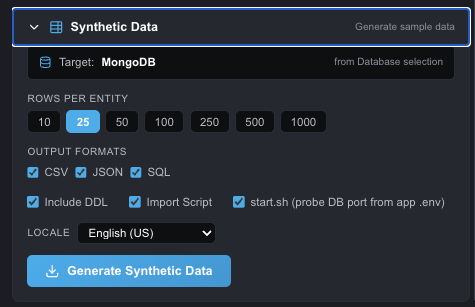
Configure synthetic data from your domain—SQL and NoSQL-friendly exports from the same design.
Pre-Generation Validation
Before generating code, EcosystemCode validates your diagrams to catch errors early. The validation checks for:
- Duplicate class names
- Invalid identifiers
- Missing required elements
- Orphaned relationships
- Incomplete workflows
Generated Application Preview
After generation, you get a complete running application. The generated React frontend includes:
- Dashboard with entity overview and statistics
- List views with search, filtering, and pagination
- Form views for creating and editing entities
- Detail views for viewing individual records
- Navigation and layout components
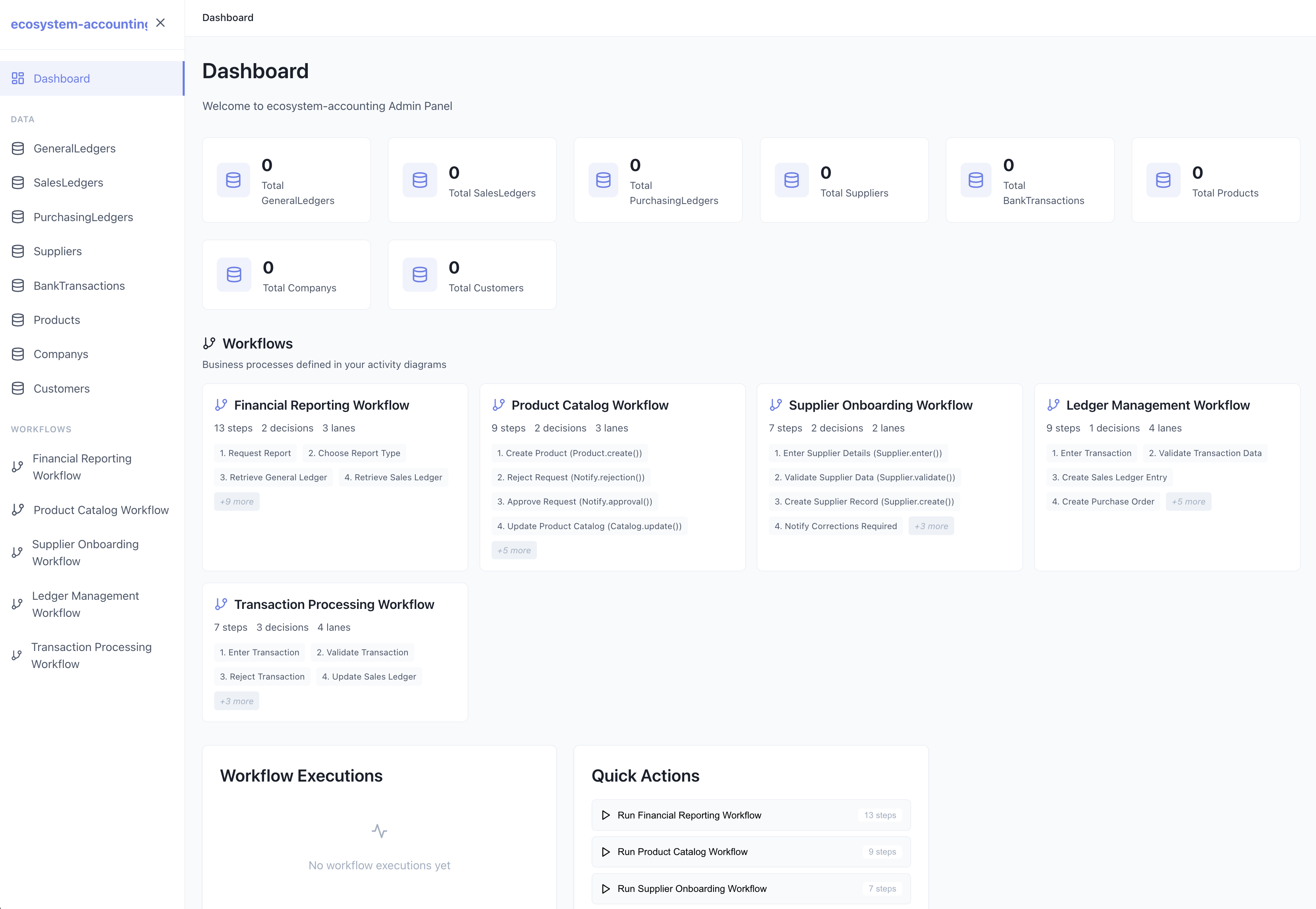
Generated Dashboard - Complete with entity cards, statistics, and navigation
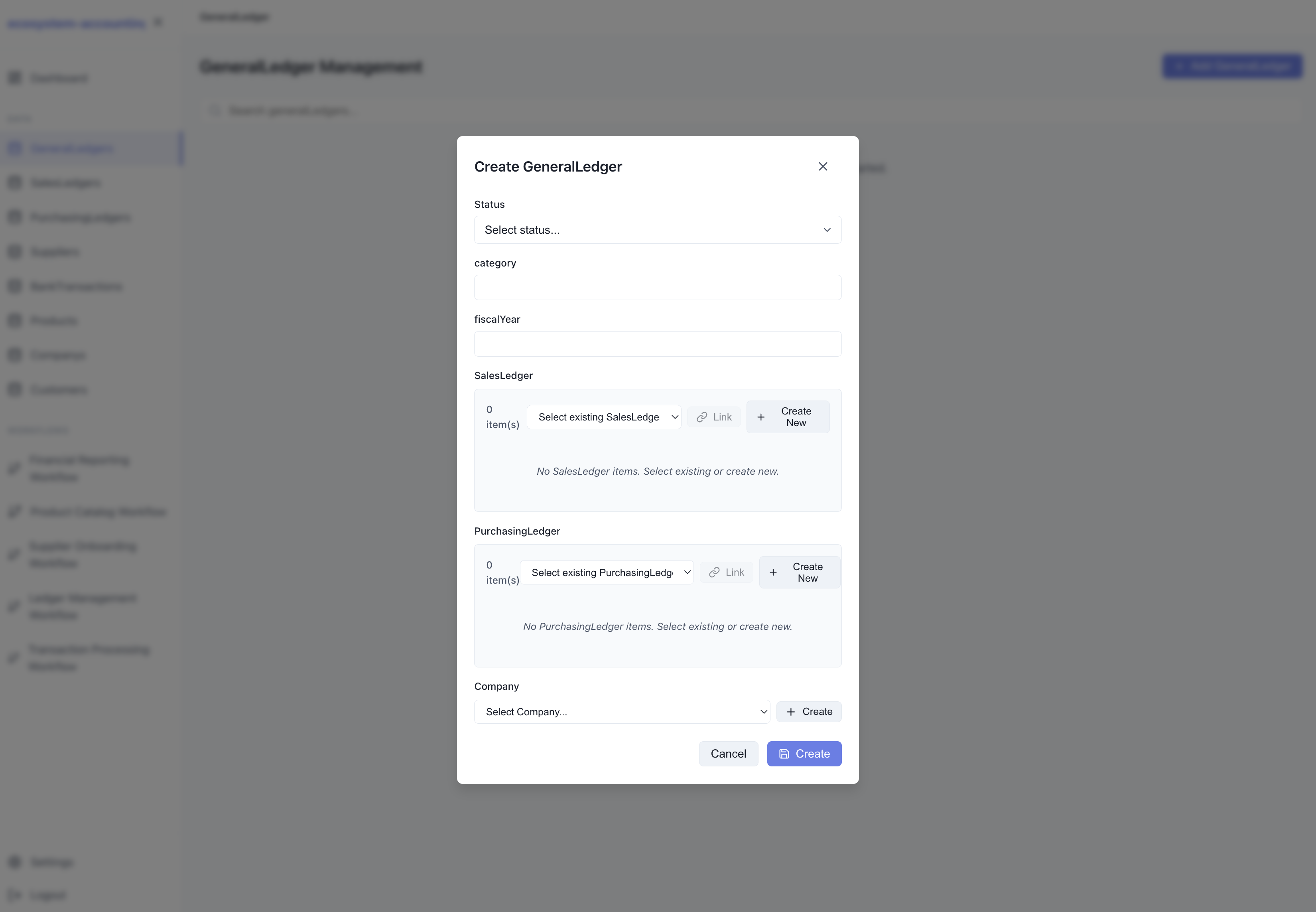
Auto-Generated Forms - Complete CRUD forms with validation and styling