Project Management
Organize your UML modeling projects, collaborate with teams, and control access with flexible sharing options
Centralized Project Dashboard
EcosystemCode provides a comprehensive dashboard for managing all your UML modeling projects in one place. Quickly access recent projects, create new ones, and organize your work efficiently.
Quick Access
The dashboard features a Quick Access section that provides:
- Create New - Start a new project with a single click
- Recent Projects - Quick access to your most recently worked on projects
- Import Projects - Import existing projects from JSON files
All Projects Overview
View all your projects in an organized grid with essential information:
- Project Name & Description - Clear identification of each project
- Diagram Count - See how many diagrams are in each project
- Quick Actions - Open projects directly or manage them from the dashboard
- Project Status - Visual indicators for project state
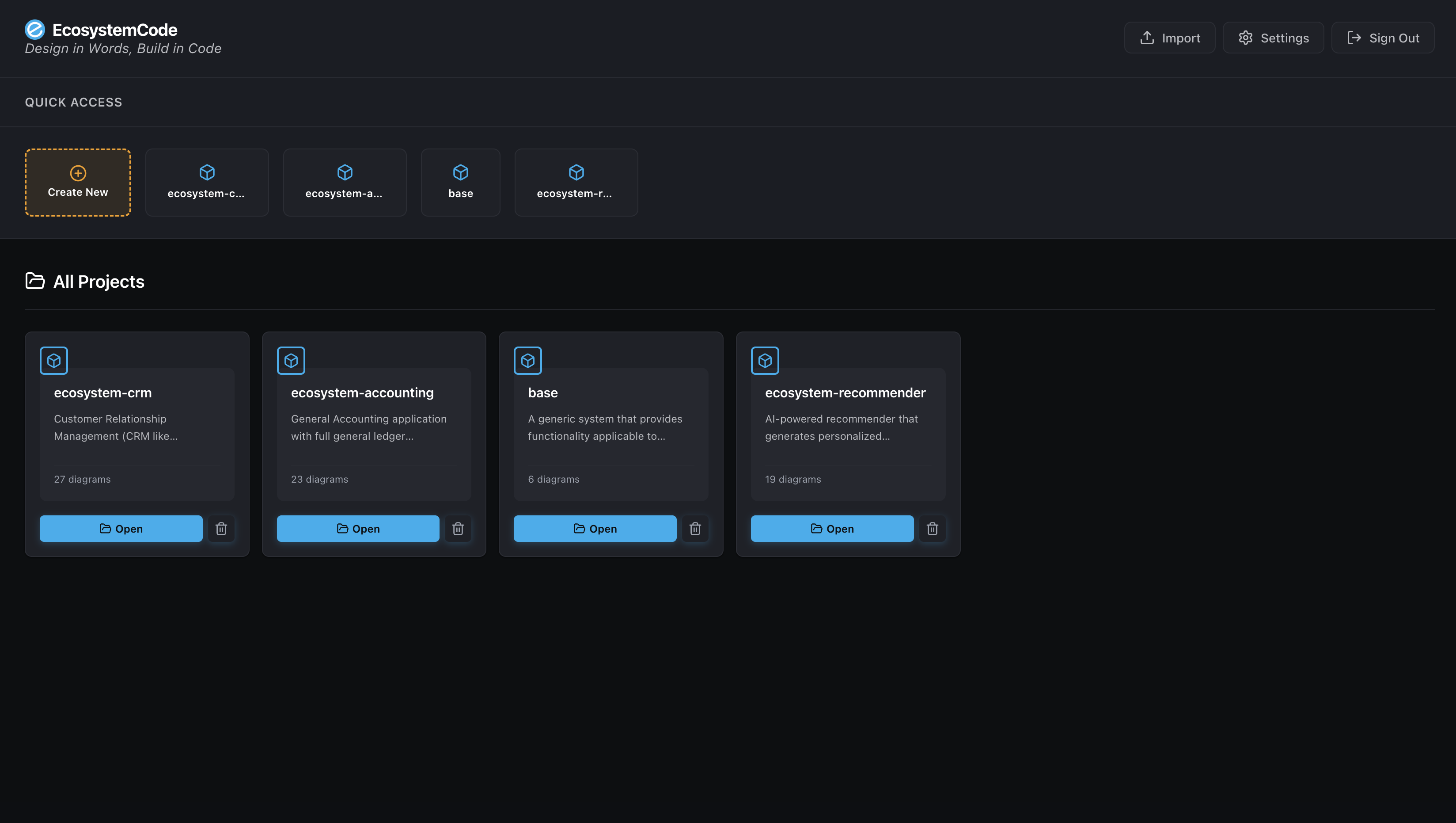
Project Dashboard - Centralized view of all your projects with quick access and management tools
Project Organization
Each project card displays:
- Project icon and name
- Project description
- Number of diagrams in the project
- Quick action buttons (Open, Delete)
This organization makes it easy to manage multiple projects, whether you're working on different systems, client projects, or experimental designs.
Team Collaboration & Sharing
EcosystemCode provides flexible sharing options that allow teams to collaborate effectively while maintaining control over project access. You can keep your work private until you're ready to share, or collaborate in real-time with your team.
Privacy Control
Projects are private by default, giving you complete control over when and how you share your work:
- Private Projects - Only you can access your projects until you decide to share
- Work in Progress - Keep your designs private while you refine them
- Selective Sharing - Share with specific team members when ready
- Public Sharing - Make projects public for templates, examples, or organization-wide access
Sharing Options
When you're ready to collaborate, EcosystemCode offers multiple sharing levels:
- View Access - Team members can see all diagrams and settings but cannot make changes. Perfect for stakeholders and reviewers.
- Edit Access - Team members can modify diagrams and project settings (except sharing). Ideal for active collaborators.
- Public Projects - Visible to all users but read-only. Useful for templates, examples, and organizational knowledge sharing.
- Owner Rights - Only the project owner can manage sharing settings and delete the project.
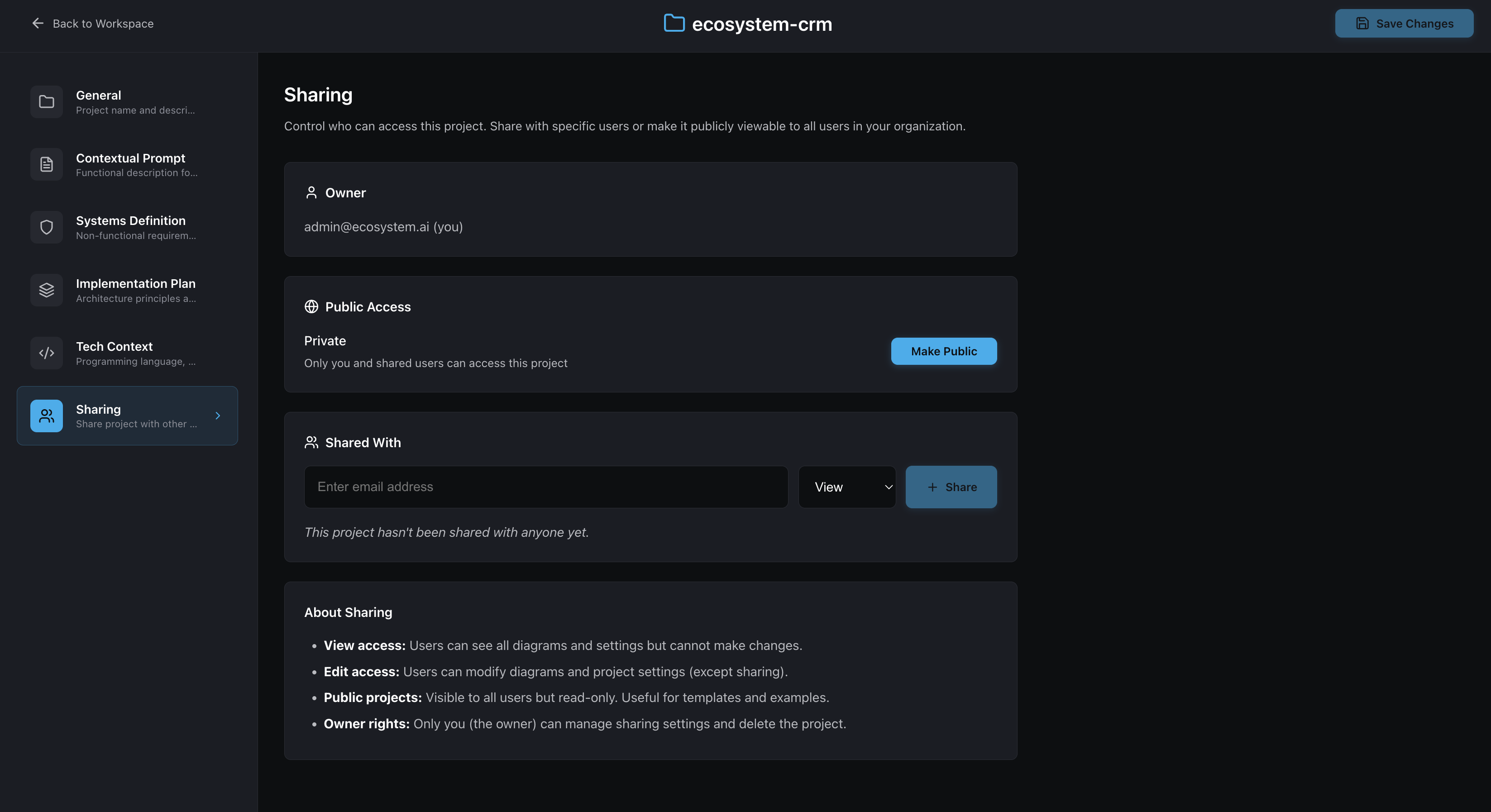
Team Sharing Settings - Control project access with flexible sharing options for collaboration
Collaborative Workflow
The sharing system supports various collaborative workflows:
- Individual Work - Start projects privately, iterate on designs, and share when ready
- Team Collaboration - Share with specific team members for real-time collaboration
- Review Process - Grant view access to stakeholders for feedback without editing rights
- Knowledge Sharing - Make completed projects public as templates or examples
- Organization Templates - Create public projects that serve as starting points for new work
Project Settings
Each project includes comprehensive settings for:
- General - Project name and description
- Contextual Prompt - Functional description for AI generation
- Systems Definition - Non-functional requirements
- Implementation Plan - Architecture principles and guidelines
- Tech Context - Programming language, frameworks, and technical stack
- Sharing - Access control and collaboration settings
Benefits of Project Management
Effective project management in EcosystemCode provides several key benefits:
- Organization - Keep all your UML projects organized in one place
- Efficiency - Quick access to recent and frequently used projects
- Collaboration - Share projects with team members when ready
- Privacy - Keep work private until you're ready to share
- Flexibility - Control who can view or edit your projects
- Scalability - Manage multiple projects across different systems and teams